

Google Workspace is Google's set of business tools for email, file storage, documents, video meetings, and AI. If you've used Gmail or Google Docs, you've used part of it. The business version adds your own email domain, more storage, admin controls, security features, and Gemini AI. It's also one of the most widely used business platforms in the world, with Google reporting more than 11 million paying Workspace customers as of 2026.1
Read on to learn what Google Workspace is, what's included, what each plan costs, and how to tell whether your organization needs it. As a Google Cloud Premier Partner, Suitebriar helps organizations set up, move to, and manage Google Workspace every day – so we'll keep this guide practical.
What Is Google Workspace?
Google Workspace is a cloud-based productivity suite. Everything runs in a web browser or mobile app, and it automatically saves your files online. Your team can work from any device, and several people can edit the same file at the same time.
The main features most organizations use are:
- Professional email on your own domain (you@yourcompany.com)
- Shared cloud storage for files, with sharing controls
- Real-time collaboration in documents, spreadsheets, and presentations
- Video meetings and team chat
- Shared calendars and scheduling
- Gemini AI built into the apps on most plans
- An Admin console to manage users, devices, and security in one place
Security in Google Workspace still depends on how you set it up, as default sharing settings and old accounts can leave gaps. A Google Workspace security audit is a quick way to find and fix them.
What Is Included in Google Workspace?
Every business plan includes the same core apps, and higher-tier plans add storage, larger meetings, more AI, and stronger security. Here’s a quick breakdown of the main apps you’ll find in Google Workspace:
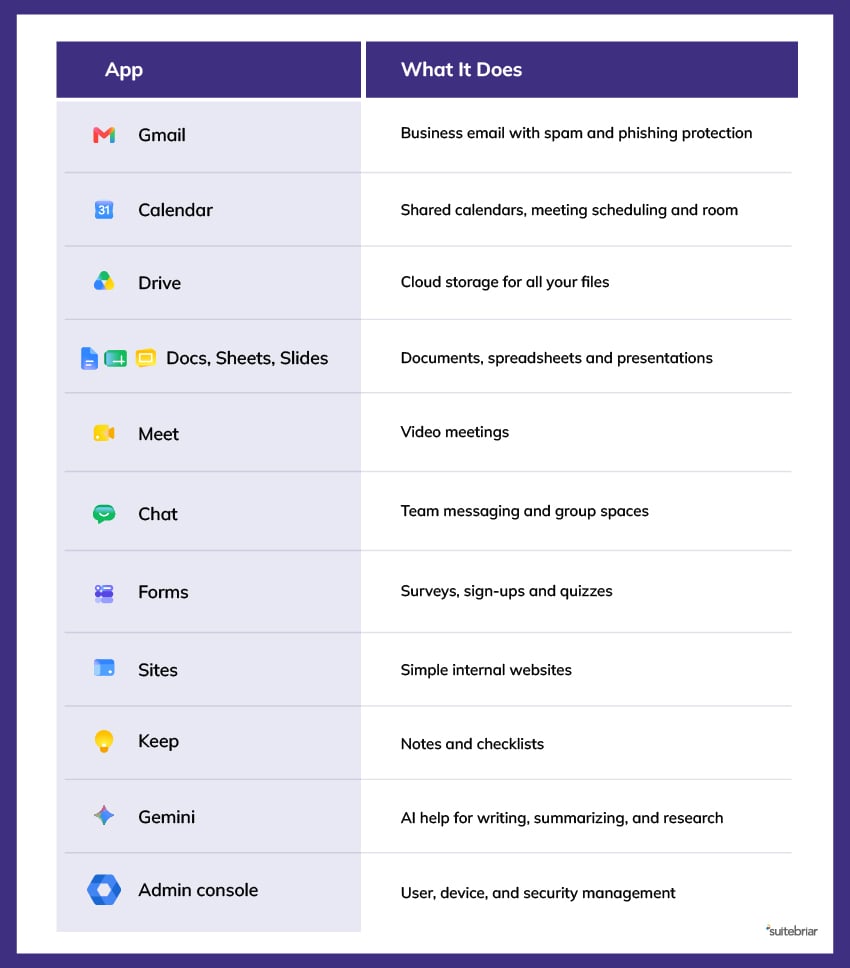 Business Plus and Enterprise plans also include Google Vault, which lets you keep, search, and export company data for legal and compliance needs.
What Is Google Workspace Used For?
Companies use Google Workspace to handle most of their daily communication and file work in one place. Let’s explore some common use cases by team:
- Leadership: Share plans in Docs, review numbers in Sheets, and hold meetings in Meet.
- Sales: Track leads in shared Sheets, schedule calls with Calendar booking pages, and send proposals from Gmail.
- Operations: Build intake forms in Forms, store procedures in shared drives, and keep projects moving in Chat spaces.
- HR: Run onboarding checklists, collect documents, and host training sessions.
- IT: Add and remove users, enforce two-step verification, manage mobile devices, and control file sharing from the Admin console.
- Everyone: Use Gemini to draft emails, summarize long threads, take meeting notes, and find files faster.
Many organizations also use Workspace as the base for AI. Because Gemini already sits inside Gmail, Docs, and Meet, teams can start using AI without buying a separate tool. Check out Suitebriar’s Gemini for Google Workspace services for help turning that access into daily habits.
What Is Google Workspace Business Starter?
Business Starter is the entry-level plan. It's a good fit for small teams that mainly need professional email and basic file sharing.
It includes: custom email, Calendar, Drive, Docs, Sheets, Slides, Meet for up to 100 people, Chat and Gemini in Gmail, and the Gemini app.
It doesn't include: Meet recordings, Gemini inside Docs and Sheets, large storage, or Vault.
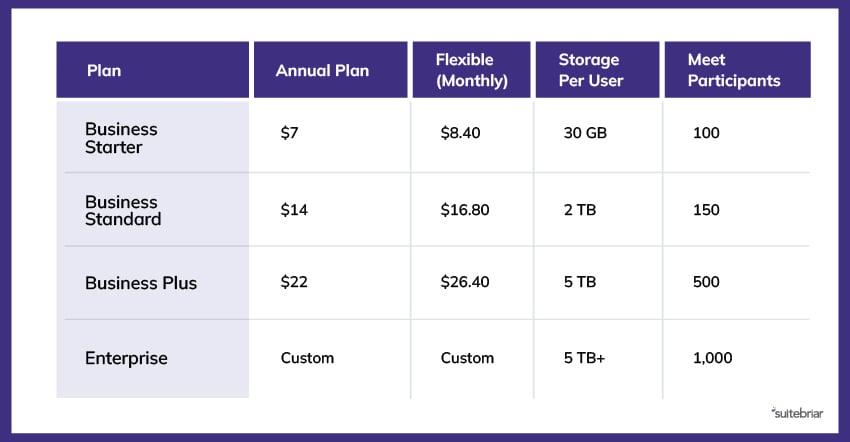
Most growing organizations end up on Business Standard. It adds 2 TB of storage per user, meeting recordings, and Gemini across the main apps for $7 more per user per month.
2026 Google Workspace Plans and Pricing
Google sells three Business plans for organizations with up to 300 users, and Enterprise plans for larger organizations. The prices below are U.S. list prices per user per month as of fall 2026:2
 Ready to get started? You can add Google Workspace licenses, view invoices, and open support tickets yourself through the Suitebriar Portal.
What Is the Benefit of Google Workspace?
These are the main benefits we hear from customers:
Centralized Platform
Email, files, meetings, and chat share one login and one admin console. That means fewer passwords for employees to manage and a single place for IT to add users, remove access, and review activity.
Real-Time Teamwork
Several people can edit the same document at once, leave comments, and see changes as they happen, and version history lets you restore an earlier draft if something goes wrong.
Work From Anywhere
Files and email are available on any device with a browser, so employees can start a document on a laptop at the office and finish it on a phone or tablet, and admins can still control which devices are allowed to access company data.
Simplified Security
Google Workspace includes features like two-step verification, phishing protection, data loss prevention, and central device management. And because IT teams manage all of these from the same Admin console, they can apply security settings across every app instead of configuring one tool at a time.
Built-In AI
As of March 2025, Gemini comes with most plans at no added charge.3 Gemini lets your teams use AI to draft emails, summarize meetings, and more without a separate subscription or extra approval.
Less IT Overhead
There are no servers to maintain, and no software installs to manage. Google handles updates automatically.
What Is Google Workspace Comparable To?
The closest comparison is Microsoft 365. Both Google Workspace and Microsoft 365 offer business email, file storage, documents, spreadsheets, meetings, chat, and AI. Here’s how each of these tools shakes out:
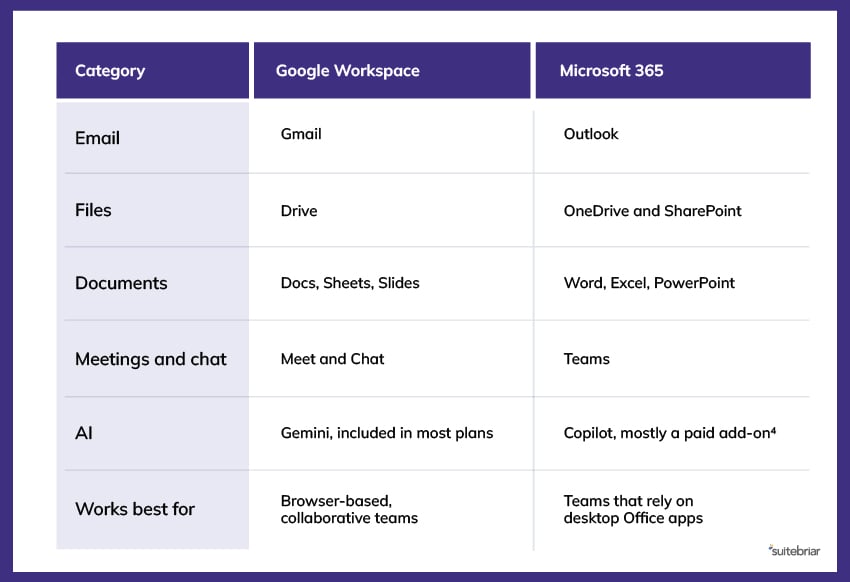 Other alternatives include Zoho Workplace for budget-focused small businesses, but for most mid-sized organizations, the real choice is between Google and Microsoft. If you're switching, Suitebriar’s Microsoft to Google Workspace migration team can move your email, files, and calendars with minimal disruption.
What Is Google Workspace, and Do I Need It?
You probably need Google Workspace if any of these are true:
- Your team uses personal Gmail accounts for work
- You want email on your own domain
- Files are scattered across laptops, USB drives, or personal accounts
- You need to remove access quickly when someone leaves
- Your team wants to use AI with company files in a controlled way
You may not need it if you're a single person with simple needs. A free account or Google Workspace Individual may be enough.
Simplify Your Google Workspace With Suitebriar
Google Workspace gives your organization professional email, shared storage, real-time collaboration, video meetings, and built-in AI in one subscription. Most teams start on Business Standard, set up their domain and security settings, then move their existing email and files over.
Google provides support, but many organizations want a team that knows their setup. At Suitebriar, we give our customers named experts, a free 24/7 help desk, and Google Workspace training for admins and end users.
Need help choosing a plan, moving from another system, or getting more from the Workspace you already have? Talk to one of our Google experts today.
Sources:
- https://www.inquirer.com/business/small-business/google-workspace-cost-savings-tips-security-20260630.html
- https://dupple.com/learn/google-workspace-pricing
- https://www.appxite.com/blog/google-includes-gemini-ai-into-workspace-with-new-pricing-model
- https://www.microsoft.com/en-us/copilot/pricing/copilot-studio