
If your company is choosing an AI assistant for work, you’re probably torn between two options: Microsoft Copilot or Google Gemini.
On a feature list, they look almost the same. Both write drafts, summarize meetings, answer questions about files, and build AI agents. The real differences come down to how each is priced and how well it fits the tools your team already uses. The decision matters more than ever, too, with 47% of U.S. employees saying they use AI for work as of May 2026.1
We'll be upfront: we're a Google Cloud Premier Partner, and we help organizations use Gemini for Google Workspace every day. But we want what’s best for your business, so we'll still be straight about where Copilot does well. Here's what actually separates the two in late 2026.
Copilot vs Gemini: The Basics
For most organizations, the right choice depends on one thing: which platform your company already runs on.
- If you run on Microsoft 365 (Outlook, Teams, SharePoint), Copilot is built for your data, and your admins already know the tools.
- If you run on Google Workspace (Gmail, Drive, Meet), Gemini is already included in your plan and works directly with your files.
- If you're weighing a switch between platforms, cost and AI become a bigger part of the decision, and that's where the gap is widest.
Ultimately, the best AI assistant for your business is rarely a standalone decision. It's tied to the email, file storage, and meeting tools your teams use every day, so the platform you're already on should be the starting point for any comparison.
5 Microsoft Copilot vs Gemini Differences That Matter
Copilot and Gemini can handle a lot of the same everyday tasks, but they have several important differences. Here’s what matters for decision-makers:
1. How You Pay for It
This is the biggest practical difference. Google now includes Gemini in its Workspace Business and Enterprise plans. Microsoft sells Microsoft 365 Copilot as a paid add-on on top of a Microsoft 365 license. We break down the numbers in the pricing section below.
2. What Data It Works With
Each assistant works best with data in its own system.
- Copilot pulls from the Microsoft Graph: Outlook email, Teams chats and meetings, SharePoint, and OneDrive files.
- Gemini pulls from Workspace: Gmail, Google Drive, Docs, Sheets, Calendar, and Meet.
An assistant is only as useful as the information it can see. If half your files live somewhere else, both tools will give weaker answers.
3. The AI Models Behind It
Copilot runs mainly on OpenAI models, and Microsoft has added Anthropic's Claude models as an option.2 Gemini runs on Google's own Gemini models, and Gemini Enterprise, Google's agent platform, now also lets organizations choose Claude models. While model choice used to be a clear Microsoft advantage, the gap is much smaller now.
4. How It Fits Daily Work
Neither is best in every day-to-day task. Copilot is strongest inside Word, Excel, PowerPoint, and Teams, while Gemini is strongest in browser-based, collaborative work like shared Docs, Gmail, Meet notes, and Drive search.
5. Your Security Setup
Both Copilot and Gemini follow your existing file permissions, so they can surface any data a user already has access to – including files that were shared too widely. Before you turn on either assistant, review your access permissions company-wide. For Google customers, a Google Workspace security audit is a practical place to start.
Where Does Each Have the Edge?
Based on what we see with customers, here's a fair split:
- Copilot tends to be stronger for heavy Excel analysis, long Word documents, PowerPoint decks built from existing files, and organizations that run their meetings in Teams.
- Gemini tends to be stronger for real-time collaboration in shared Docs, searching across Gmail and Drive, Meet notes, and organizations that want AI included without a separate license.
- Both are similar for drafting email, summarizing threads, answering questions about company files, and basic chat capabilities.
These strengths line up with how each company's productivity apps were built. Microsoft's desktop Office apps have deep features for complex documents and spreadsheets, while Google's apps were designed from the start for shared, browser-based work, and each AI assistant inherits those strengths.
Google Gemini Enterprise vs Microsoft Copilot for Building AI Agents
In 2026, the comparison has moved past chat assistants to AI agents: software that can carry out multi-step tasks, such as onboarding a new hire or routing a support request.
Microsoft
Microsoft offers two tools. Agent Builder inside Copilot lets employees create simple agents without code. Copilot Studio is for more complex, multi-step agents that connect to business systems through Microsoft's Power Platform.
Google brought its agent tools together under Gemini Enterprise at Google Cloud Next '26 in April.3 Business users can build agents in plain language or with a visual Agent Designer, and admins can track agent activity from one place. In October, Google announced a universal Gemini agent, now in private preview, that can work across apps, including Microsoft 365 and Slack.
What This Means for Your Team
Both platforms make it easy to build an agent. The harder part now is picking the right workflow, cleaning up your data access, and getting your people to use it. At Suitebriar, we offer AI use case workshops and Gemini Enterprise services that focus on those steps, not just the setup.
Microsoft Copilot vs Google Gemini Pricing Comparison
Here's what list pricing looks like as of fall 2026, in U.S. dollars per user per month with an annual commitment:
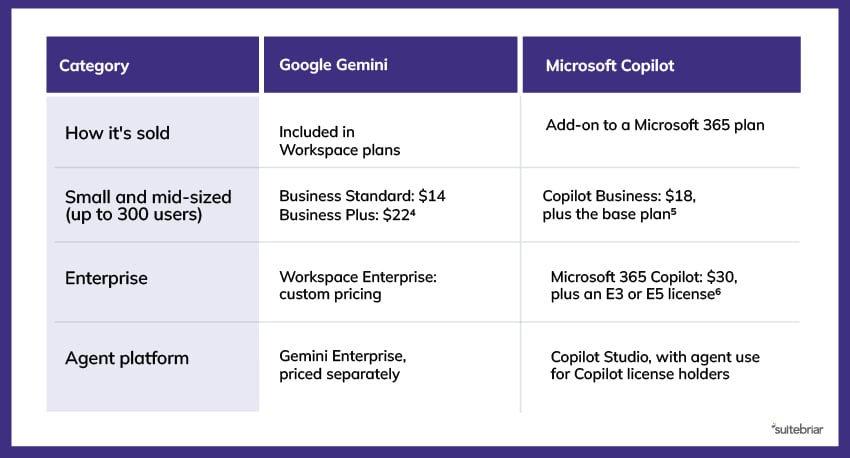 Prices for these tools change often, so confirm current rates before you budget.
How To Choose Between Microsoft Copilot vs Google Gemini for Enterprise
Ready to start evaluating? Use these questions to narrow down your decision:
- Where does your work already happen? Start by looking at the assistant built for your main platform. Running two productivity suites to get a different AI tool rarely pays off.
- What will it cost per user, all in? Add the base license and the AI license together. For Microsoft customers, Copilot is a separate line item. For Google customers, Gemini is part of the plan.
- Is your data ready? Check all sharing settings, old files, and access rights before rollout – company-wide. Both tools will expose oversharing.
- Who will train your people? Licenses alone don't create results. Your teams need short, role-based training to build new habits. Explore our Google Workspace training for examples.
- Do you plan to build agents? If yes, compare Copilot Studio and Gemini Enterprise on the workflows you actually want to automate, not on demos.
Some businesses look at Copilot's price and wonder if moving to Google Workspace would cost less. Sometimes it does, especially for teams that don't depend on desktop Excel or complex Word documents.
However, keep in mind that a switch is a bigger project than an AI rollout. If you're considering it, plan your Microsoft-to-Google Workspace migration carefully so that your team’s emails, files, and calendars move with as little disruption as possible.
Pick Your Right-Fit AI Assistant With Suitebriar
Copilot and Gemini have never looked more alike on paper – which is exactly why a feature list shouldn't make this decision for you. The assistant that will pay off is the one built into the apps your people already open every morning, with access to the information they rely on. If your organization runs on Microsoft 365 and the add-on cost fits your budget, Copilot is a natural fit. If you're on Google Workspace, Gemini is already part of your plan, so the decision is largely made for you.
Want a clear view of what Gemini can do for your team? We're happy to help. Talk to a Google expert at Suitebriar today.
Sources:
- https://www.gallup.com/699797/indicator-artificial-intelligence.aspx
- https://www.microsoft.com/en-us/copilot/blog/copilot-studio/anthropic-joins-the-multi-model-lineup-in-microsoft-copilot-studio
- https://blog.google/innovation-and-ai/infrastructure-and-cloud/google-cloud/google-cloud-next-26-recap
- https://workspace.google.com/lp/business
- https://www.microsoft.com/en-us/copilot/pricing/business
- https://www.microsoft.com/en-us/copilot/pricing/enterprise