
Google Workspace costs between $7 and $26.40 per user per month for most businesses, depending on the plan you pick and how you pay.1 Larger organizations on Enterprise plans get custom pricing.
That's the short answer to how much Google Workspace costs per month. However, the real cost depends on how many people you have, how much storage and security you need, and whether you commit for a year.
In this guide, we’ll break down every Workspace plan, what you'll pay per month and per year, and a few ways to avoid paying for more than you need.
How Much Is Google Workspace Per Month?
Google offers two ways to pay:
- The Annual plan, where you commit for a year and pay a lower monthly rate.
- The Flexible plan, where you pay month to month and can add or remove users anytime.
Here’s a side-by-side comparison of how much each costs per user per month as of November 2026:1
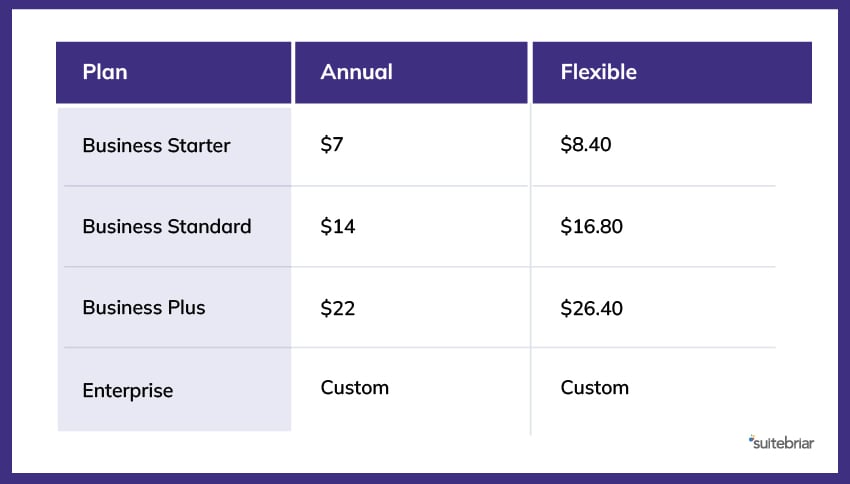
These are U.S. list prices before tax. Business plans work for organizations with up to 300 users. Above that, you'll need an Enterprise plan.2
Annual vs. Flexible
Choose the Annual plan if your headcount is consistent. You'll pay less, and you can still add users during the year – although you can't lower your license count until the plan renews.
Choose Flexible if your team size changes often, you're trying Google Workspace for the first time, or you'd rather not commit for 12 months. Many teams start on Flexible while they move over from another system, then switch to Annual once things settle down.
What Is the Cost of Google Workspace by Plan?
Every plan includes business email on your own domain, Calendar, Drive, Docs, Sheets, Slides, Meet, and Chat. What changes is storage, meeting size, security, and how much Gemini AI you get.2
Business Starter: $7 Per User Per Month
- 30 GB of pooled storage per user
- Meetings with up to 100 people
- Gemini in Gmail and the Gemini app
Good for: small teams that mainly need professional email and basic file sharing.
Business Standard: $14 Per User Per Month
- 2 TB of pooled storage per user
- Meetings with up to 150 people, plus recording
- Gemini in Gmail, Docs, Meet and more
Good for: most growing teams. It's the plan most organizations end up on once they need shared storage and recorded meetings.
Business Plus: $22 Per User Per Month
- 5 TB of pooled storage per user
- Meetings with up to 500 people
- Google Vault and eDiscovery for keeping and searching company data
Good for: organizations with legal, compliance, or record-keeping needs.
Enterprise: Custom Pricing
Enterprise plans don’t have a user limit, and they add more security, data controls, and support options. Pricing depends on your number of users and contract terms, so you'll need to get a quote.
How Much Is Google Workspace Per Year?
This is what a team pays in a year, based on Annual plan pricing:
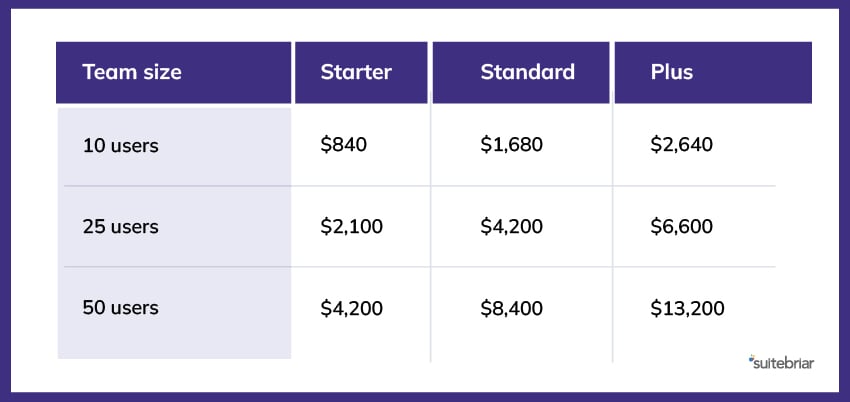
If you choose the Annual plan, here's what one user costs for a full year:1
- Business Starter: $84 per user per year
- Business Standard: $168 per user per year
- Business Plus: $264 per user per year
On the Flexible plan, the same year would cost $100.80, $201.60, or $316.80 per user.1
How Much Is a Google Workspace Account?
Google charges per user, so each account costs the same as the plan it's on. A single Business Standard account is $14 per month on an annual plan.1
You can also mix plans on one domain. For example, your leadership team could be on Business Plus while the rest of the company uses Business Standard. That way, you only pay for higher-tier features where people actually need them.
Is Gemini AI Included in the Price?
Yes. Google now includes Gemini in its Business and Enterprise plans instead of selling it as a separate add-on, but how much AI you get depends on the plan. Business Starter includes Gemini in Gmail and the Gemini app, while Business Standard and above add Gemini in Docs, Meet, and other apps.2
Having Gemini in your plan and getting value from it are two different things, though. Our Google Workspace with Gemini services help teams set it up and build it into daily work.
What Is the Cheapest Google Workspace Plan?
The cheapest paid plan is Business Starter at $7 per user per month on an annual billing plan.1
Google also offers a free option called Essentials Starter, with 15 GB of storage.³ It doesn't include Gmail or email on your own domain, so it doesn't work as a business email solution.
If you're comparing Starter and Standard, our breakdown of Business Starter vs. Standard for growing teams walks through when the upgrade is worth it.
How Much Is Google Workspace Email?
For most businesses, Google Workspace email costs $7 per user per month with Business Starter. That gets you Gmail with your own domain (you@yourcompany.com), spam and phishing protection, and 30 GB of storage.
You'll also need a domain name, which you buy separately if you don't already own one.
However, you can keep email costs down by using:4
- Aliases: Each user can have up to 30 email aliases at no extra cost, such as sales@ or info@ pointing to one inbox.
- Google Groups: A group like support@ can deliver to several people without paying for its own license.
How Much Is Google Workspace for One Person?
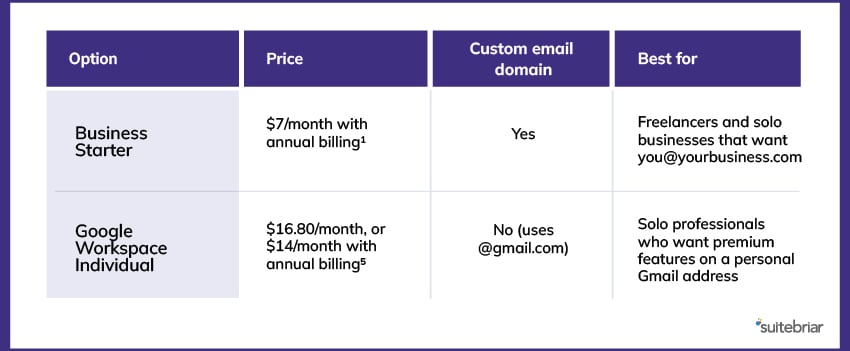 If you're a solo business owner, you have two options:
Business Starter is the better choice for most one-person businesses, since it’s cheaper and gives you professional email on your own domain.
Extra Costs To Plan For
The plan price covers the core apps, but some features cost extra:
-
Google Voice for business phone numbers starts at $10 per user per month.6
-
AppSheet for building custom apps is a separate add-on on most plans.
-
Migration from another email system may require outside help, especially for larger teams.
4 Ways To Save on Google Workspace
Most organizations can lower their Google Workspace bill with a few simple steps:
- Pay Annually: You'll save about 17% compared with the Flexible plan.1
- Mix Plans: Make sure you’re putting people on the lowest plan that covers their needs.
- Check Nonprofit Pricing: Qualifying nonprofits can get Google Workspace for Nonprofits free, or Business Standard for $3.50 per user per month.7
- Remove Inactive Accounts: Former employees with active licenses are a common source of wasted spend.
Buying through a partner also has advantages. With our Suitebriar Portal, you can add or remove licenses, view invoices, and manage billing yourself, and our customers get a free 24/7 help desk. If you're switching from Microsoft, our Google Workspace migration team can move your email, files, and calendars over.
Choose the Right Plan for Your Budget With Suitebriar
Most growing organizations find that Business Standard covers what they need, and the savings usually come from keeping that setup up to date as the team changes. Reviewing your licenses each year and matching each person to the plan they really need will almost always cost less than if you pick a plan once and never look at it again.
Need help choosing the right plan, cutting license costs, or setting up a new Google Workspace account? We offer a free review of your Google environment. Talk to a Google expert at Suitebriar today to get started.
Sources:
- https://knowledge.workspace.google.com/admin/billing/compare-flexible-and-annual-fixed-term-payment-plans?hl=en
- https://dupple.com/learn/google-workspace-pricing
- https://workspace.google.com/essentials
- https://knowledge.workspace.google.com/admin/users/add-or-delete-an-alternate-email-address-email-alias
- https://workspace.google.com/individual
- https://workspace.google.com/products/voice
- https://www.google.com/nonprofits/workspace/compare