Before heading into an introductory sales call, enterprise account executives frequently spend 45 to 60 minutes digging across fragmented tabs: scanning CRM records, digging up past email threads, reviewing competitor battlecards, and scrolling LinkedIn or news feeds for recent company updates.
In a recent walkthrough by Alfonso Martínez, Google Cloud Professional Architect and Gemini Enterprise Certified Partner Specialist at Suitebriar, that entire workflow gets compressed into under 60 seconds.
Using the visual builder in Gemini Enterprise, you can construct a no-code Pre-Sales Research Assistant that automatically outputs a comprehensive, nine-section account brief tailored to your products and ground-truth records.
Here is how the multi-agent system works and how your revenue team can build it without writing code.
The Problem: The High Cost of Manual Pre-Call Prep
Sales preparation usually encounters three major bottlenecks:
-
Information Silos: Past account context lives in CRM exports, shared Google Drives, and reps' inboxes.
-
Context Latency: Finding relevant case studies, competitor matrices, and discovery questions tailored to a specific vertical requires manual hunting.
-
Data Security Risks: Copy-pasting sensitive internal CRM records into public generative AI tools exposes private enterprise data.
Gemini Enterprise solves these challenges through grounded multi-agent architecture, allowing you to combine private company records with live web searches while keeping sensitive data isolated.
The Architecture: Lead Agent & Specialized Sub-Agents
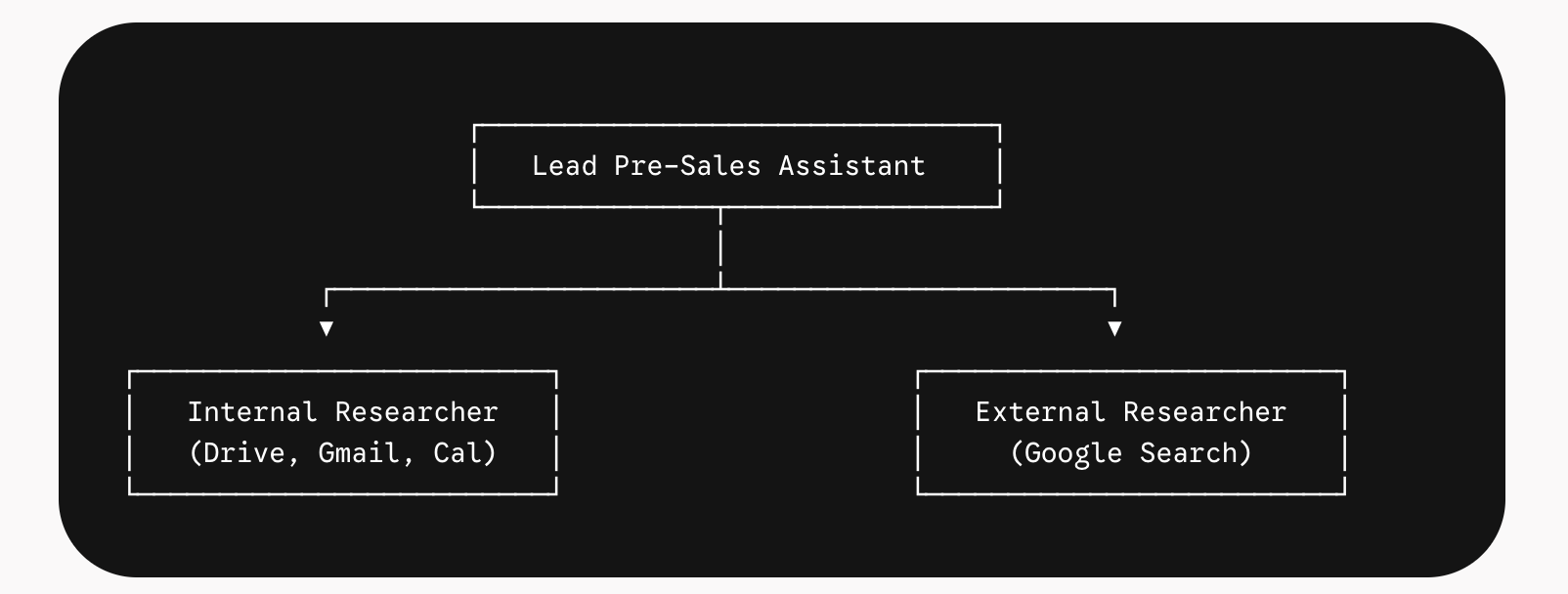
Rather than relying on a single, catch-all system prompt, this workflow relies on a modular multi-agent setup:
-
Lead Pre-Sales Assistant: Acts as the orchestrator. It receives the target company name, instructs the sub-agents, matches incoming findings against internal case studies and offerings, and formats the unified 9-section brief.
-
Internal Researcher Sub-Agent: Connected strictly to internal sources (Google Drive, Gmail, and Google Calendar). It pulls past opportunity history, existing contracts, and previous meeting notes without touching the public internet.
-
External Researcher Sub-Agent: Uses Google Search grounding to uncover recent press releases, C-level leadership appointments, and strategic initiatives from the past 12 months. It has zero access to your internal files.
Step-by-Step: Building the Agent in Gemini Enterprise
Step 1: Centralize Sales Knowledge Sources
Before configuring the agent, ensure your foundational sales collateral is accessible within Google Drive:
-
CRM Opportunity Data: Exported spreadsheets tracking deal stages, ARR, and renewal dates.
-
Offerings & Proof Points: Solution catalogs detailing business outcomes, implementation timelines, and references.
-
Battlecards: Competitive positioning sheets (e.g., Google Workspace vs. Microsoft 365).
-
Ideal Customer Profile (ICP) & Case Studies: Vertical-specific qualification questions and customer success benchmarks.
Step 2: Configure the Internal Researcher Sub-Agent
-
In the Gemini Enterprise navigation bar, select Agents > New Agent > Build Manually.
-
Add a new sub-agent titled
Internal Researcher. -
Model Selection: Select Gemini Pro for nuanced synthesis across unstructured spreadsheets and email strings.
-
Tool Connectors: Enable Google Drive, Gmail, and Google Calendar. Keep Google Search unchecked.
-
Prompt Rules: Instruct the agent to strictly pull internal history, cite every fact with the source record, and label points as
[Internal].
Step 3: Configure the External Researcher Sub-Agent
-
Add a second sub-agent titled
External Researcher. -
Model Selection: Gemini Flash offers rapid web extraction.
-
Tool Connectors: Enable Google Search only.
-
Prompt Rules: Instruct the agent to find C-level personnel shifts, corporate news, and strategic priorities within the past 12 months. Instruct it to label external facts as
[External]and mark inferences as "likely" rather than inventing data.
Step 4: Define the Master Brief Template
In the primary agent configuration, attach core knowledge assets (like your ICP guide and service packages). Enforce a standard nine-section briefing framework across every output:
| Brief Section | Focus Area | Data Source |
| 1. Snapshot | Headcount, HQ, estimated revenue, industry | External Search + Internal CRM |
| 2. Our History | Relationship stage, prior outreach, account owner | Internal CRM / Gmail / Cal |
| 3. Business Priorities | Stated goals, infrastructure initiatives | Public news & signals |
| 4. Key Stakeholders | Decision-makers, titles, relevant focus areas | Internal records + Web verification |
| 5. Buying Signals | Upcoming renewals, hiring trends, tooling changes | CRM milestones + Job boards |
| 6. Strategic Fit | Solutions mapped to detected pain points | Service Offering Knowledge Docs |
| 7. Talking Points | 3–5 commercial talking angles | Internal Battlecards |
| 8. Discovery Questions | Targeted questions by persona (e.g., IT vs. Finance) | Persona Discovery Matrix |
| 9. Risks & Unknowns | Incumbent competitors, adoption hurdles | CRM notes + Market positioning |
Putting It to the Test: Live Account Research
During the demonstration, the agent is prompted with a single account: Summit Ridge Logistics.
Within seconds, the multi-agent system constructs a complete dossier:
-
Identifies the Trigger: The internal sub-agent surfaces that the prospect's Microsoft Enterprise Agreement (EA) renews in June and flags an expected pricing increase.
-
Flags Leadership Turnover: The external sub-agent confirms a new CIO took the helm in July.
-
Aligns Collateral: The lead agent pairs their finance department's heavy reliance on Excel with a specific migration case study (Pinecrest Health Partners) that achieved a 28% annual licensing cost reduction.
Automated Objection Handling
When the seller asks how to handle an anticipated objection—"Our finance team can't live without Excel"—the agent queries internal battlecards to supply commercial and technical responses:
-
Hybrid licensing structures that preserve legacy Microsoft sheets for power users.
-
Native interoperability within Google Sheets.
-
Connected Sheets performance for large-scale logistics data processing.
One-Click First-Touch Outreach
With the brief completed, the seller prompts:
"Draft a first email to the new CIO, built from the brief."
The agent generates a tailored outreach email directly from the discovered data points—congratulating the CIO on their recent appointment, referencing their upcoming June EA renewal timeline, and citing the exact peer case study.
Key Benefits for Sales Organizations
-
Reclaim 5+ Hours per Rep Weekly: Eliminating manual pre-call information gathering lets sellers spend more time meeting with buyers.
-
Consistent Deal Execution: Standardized briefs ensure every AE enters calls equipped with battlecard talking points and relevant customer stories.
-
Enterprise-Grade Governance: Multi-agent separation ensures private CRM deals and pipeline values remain walled off from web search queries.
-
Zero Technical Debt: Business operations and sales enablement teams can maintain and iterate on agent prompts without needing software engineering resources.
Frequently Asked Questions (FAQ)
-
Can Gemini Enterprise connect directly to non-Google CRMs like Salesforce or HubSpot?
- Yes. Gemini Enterprise supports structured data ingest via Google Cloud storage connectors, BigQuery, and enterprise API integration frameworks, allowing you to feed CRM exports or active pipeline mirrors directly into your agent's knowledge base.
-
Does using Google Search expose my internal data to the public?
- No. Because the multi-agent architecture isolates the
Internal Researcherfrom theExternal Researcher, search queries executed on the public web do not send private CRM values or customer files.
- No. Because the multi-agent architecture isolates the
-
What is the advantage of using Gemini 1.5 Pro over Flash for the lead agent?
- The lead agent often handles complex document synthesis—evaluating multiple case studies, customer matrices, and spreadsheets simultaneously. Gemini Pro's expanded reasoning capabilities handle cross-document synthesis and long-context analysis with greater precision.
Looking to implement conversational AI and custom agents across your sales organization? Get in touch with Google Cloud Premier Partner Suitebriar to explore customized Gemini Enterprise deployments.